This guide is designed to provide an introduction to using the API, the data that can be accessed using the API and what data formats to expect from the API. Additional support is available through our support system.
Majestic maintains two indexes of backlink data. Please see index update details at majestic.com for information on when these indexes were most recently updated.
The Fresh Index contains the most recent data crawled. Our Fresh Index is updated frequently throughout the day. The links within the Fresh Index tend to have a higher probability of being live than links found in the Historic Index as these links were visited most recently. We recommend using the Fresh Index for the most accurate Flow Metrics results.
The Historic Index is the largest index of backlinks available on the web. This index spans back more than 5 years and is good for analysing the history of any given site or for reaffirming past relationships that are no longer live.
Many requests return the global variables FirstBackLinkDate and MostRecentBackLinkDate which can be used to determine the actual date range of the results returned from the index for that command.
Use the datasource parameter to control which index is queried. Datasource can either be specified as datasource=historic or datasource=fresh.
We provide a development sandbox for testing purposes. Commands called in this environment will return data for only a specialized subset of our Historic data and will not incur allowance costs.
To switch development environments at either protocol-level or through our connectors change the service endpoint, as demonstrated below.The client is responsible for the maintenance and security of the API key. A discussion of some security considerations and key management tools can be found on our API Security Page.
Each request must be authenticated through a valid authentication protocol. There are two methods of authentication - Internal/Reseller and OpenApp.
This is the authentication mechanism used by Platinum (Legacy) or API subscribers who use our API for internal or reseller purposes. It uses a unique token known as an API key to authenticate the request. This mechanism must be explicitly enabled before use.
To enable Internal/Reseller authentication, simply select the Enable API option from the API tab at the Majestic website.
This is the authentication mechanism used by our OpenApp platform. It requires two pieces of information - an OpenApp private key, which identifies the application, and an access token, which identifies the user and allows the application access to their subscription resources.
For more information about our OpenApp platform, see our developer guide.
Both our Full API and OpenApp protocols are supported by our connectors.
Examples of connector requests can be found at the connectors tab.
The following allowances are available with Platinum (Legacy) or API plans:
Calling API commands using the Live Service endpoint will consume one or more of these units. Details about specific units consumed are shown on each command's reference page.
The API works over the HTTP protocol, taking parameters from the request and returning a response in either XML or JSON. While you have the option to work on the protocol-level directly, we recommend exploring our suite of connectors.
Each command has its own set of parameters and characteristics. Some commands may support queuing, some may support batching or some commands may support both queuing and batching. Please refer to the specific command's documentation during integration.
All data is transmitted in UTF-8 format and may contain HMTL entities.
We are now able to return API data in JSON format as well as XML format. XML is available through http://enterprise.majestic.com/api_command and JSON is available through http://enterprise.majestic.com/api/json.
Return messages contain a set of message level parameters. These message level parameters may contain a set of datatables. It is possible for zero or more of these datatables to be returned with each message. Each returned datatable may contain its own parameters as well as zero or more rows of data.
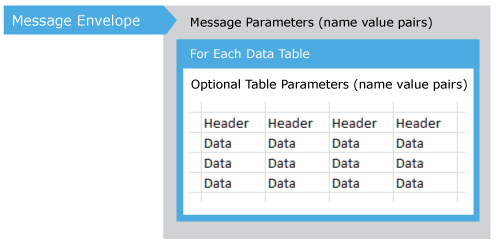
Certain commands can produce at least one data table which include that consist of header with values and rows of data. Total number of available tables is shown Count parameter of DataTables element, and each subsequently embedded DataTable elements will have the following parameters: Name, RowsCount and Headers.
If rows of data are provided, the header information will be provided on a per table basis in order to identify columns. The ordering of columns is not guaranteed to be consistent between requests so positional data should only be used to map headers. Majestic reserves the right to vary the rows, columns and parameters of tables for any message returned at any time.
Datatable headers and row data are delimited by the Pipe character "|" (hexadecimal character: 0x7C). It is possible that some text cells may contain a "|" as part of the data, in which case the single pipe will be replaced with a double pipe - "||", so the data "Good Products | USA" is represented in the raw message data as "Good Products || USA".
Some cells may have empty values. In order to differentiate an empty cell from a quoted pipe, such empty cells are represented by a single space character (hexadecimal 0x20):
Text| |more text
   ^
The correct interpretation of the space within a cell is context sensitive, and is left to the client application to interpret.
<?xml version="1.0" encoding="UTF-8"?>
<Result Code="OK" ErrorMessage="" FullError="">
   <GlobalVars FirstBackLinkDate="2017-07-13" IndexBuildDate="2017-10-15 16:23:38" IndexType="1" MostRecentBackLinkDate="2017-10-14" QueriedRootDomains="0" QueriedSubDomains="0" QueriedURLs="1" QueriedURLsMayExist="0" ServerBuild="2017-10-13 13:57:22" ServerName="QUACKYO" ServerVersion="1.0.6495.23321" UniqueIndexID="20171015162338-FRESH" />
   <DataTables Count="1">
      <DataTable Name="Results" RowsCount="1" Headers="ItemNum|Item|ResultCode|Status|ExtBackLinks|RefDomains|AnalysisResUnitsCost|ACRank|ItemType|IndexedURLs|GetTopBackLinksAnalysisResUnitsCost|DownloadBacklinksAnalysisResUnitsCost|DownloadRefDomainBacklinksAnalysisResUnitsCost|RefIPs|RefSubNets|RefDomainsEDU|ExtBackLinksEDU|RefDomainsGOV|ExtBackLinksGOV|RefDomainsEDU_Exact|ExtBackLinksEDU_Exact|RefDomainsGOV_Exact|ExtBackLinksGOV_Exact|CrawledFlag|LastCrawlDate|LastCrawlResult|RedirectFlag|FinalRedirectResult|OutDomainsExternal|OutLinksExternal|OutLinksInternal|OutLinksPages|LastSeen|Title|RedirectTo|Language|LanguageDesc|LanguageConfidence|LanguagePageRatios|LanguageTotalPages|RefLanguage|RefLanguageDesc|RefLanguageConfidence|RefLanguagePageRatios|RefLanguageTotalPages|CrawledURLs|RootDomainIPAddress|TotalNonUniqueLinks|NonUniqueLinkTypeHomepages|NonUniqueLinkTypeIndirect|NonUniqueLinkTypeDeleted|NonUniqueLinkTypeNoFollow|NonUniqueLinkTypeProtocolHTTPS|NonUniqueLinkTypeFrame|NonUniqueLinkTypeImageLink|NonUniqueLinkTypeRedirect|NonUniqueLinkTypeTextLink|RefDomainTypeLive|RefDomainTypeFollow|RefDomainTypeHomepageLink|RefDomainTypeDirect|RefDomainTypeProtocolHTTPS|CitationFlow|TrustFlow|TrustMetric|TopicalTrustFlow_Topic_0|TopicalTrustFlow_Value_0|TopicalTrustFlow_Topic_1|TopicalTrustFlow_Value_1|TopicalTrustFlow_Topic_2|TopicalTrustFlow_Value_2" MaxTopicsRootDomain="30" MaxTopicsSubDomain="20" MaxTopicsURL="10" TopicsCount="3">
         <Row>0|http://www.majestic.com/|OK|Found|390371|681|390371|6|3|1|5000|390372|63620|358|323|3|11|0|0|1|1|0|0|True|2017-10-14|HTTP_301_PermanentRedirect|True|DownloadedSuccessfully|0|0|1|1| |Majestic®: Marketing Search Engine and SEO Backlink Checker|https://majestic.com/| | | | |0| | | | |0|1| |390448|24|0|2421|388515|68837|0|388424|7|2017|662|595|19|681|0|43|32|32|Computers/Internet/Web Design and Development|29|Computers/Internet|28|Business/E-Commerce|25</Row>
      </DataTable>
   </DataTables>
</Result>
Return messages contain a set of message level parameters, and may optionally also contain a set of datatables. Zero or more datatables may be returned for each message. Each datatable may optionally contain its own parameters, and in addition, contains zero or more rows of data. Majestic reserves the right to vary the order of the returned data at any time.
{
"Code": "OK",
"ErrorMessage": "",
"FullError": "",
"FirstBackLinkDate": "2017-07-13",
"IndexBuildDate": "2017-10-15 16:23:38",
"IndexType": 1,
"MostRecentBackLinkDate": "2017-10-14",
"QueriedRootDomains": 0,
"QueriedSubDomains": 0,
"QueriedURLs": 1,
"QueriedURLsMayExist": 0,
"ServerBuild": "2017-10-13 13:57:22",
"ServerName": "QUACKYO",
"ServerVersion": "1.0.6495.23321",
"UniqueIndexID": "20171015162338-FRESH",
"DataTables": {
	"Results": {
		"Headers": {
			"MaxTopicsRootDomain": 30,
			"MaxTopicsSubDomain": 20,
			"MaxTopicsURL": 10,
			"TopicsCount": 3
		},
		"Data": [
			{
				"ItemNum": 0,
				"Item": "http://www.majestic.com/",
				"ResultCode": "OK",
				"Status": "Found",
				"ExtBackLinks": 390371,
				"RefDomains": 681,
				"AnalysisResUnitsCost": 390371,
				"ACRank": 6,
				"ItemType": 3,
				"IndexedURLs": 1,
				"GetTopBackLinksAnalysisResUnitsCost": 5000,
				"DownloadBacklinksAnalysisResUnitsCost": 390372,
				"DownloadRefDomainBacklinksAnalysisResUnitsCost": 63620,
				"RefIPs": 358,
				"RefSubNets": 323,
				"RefDomainsEDU": 3,
				"ExtBackLinksEDU": 11,
				"RefDomainsGOV": 0,
				"ExtBackLinksGOV": 0,
				"RefDomainsEDU_Exact": 1,
				"ExtBackLinksEDU_Exact": 1,
				"RefDomainsGOV_Exact": 0,
				"ExtBackLinksGOV_Exact": 0,
				"CrawledFlag": "True",
				"LastCrawlDate": "2017-10-14",
				"LastCrawlResult": "HTTP_301_PermanentRedirect",
				"RedirectFlag": "True",
				"FinalRedirectResult": "DownloadedSuccessfully",
				"OutDomainsExternal": "0",
				"OutLinksExternal": "0",
				"OutLinksInternal": "1",
				"OutLinksPages": "1",
				"LastSeen": "",
				"Title": "Majestic®: Marketing Search Engine and SEO Backlink Checker",
				"RedirectTo": "https://majestic.com/",
				"Language": "",
				"LanguageDesc": "",
				"LanguageConfidence": "",
				"LanguagePageRatios": "",
				"LanguageTotalPages": 0,
				"RefLanguage": "",
				"RefLanguageDesc": "",
				"RefLanguageConfidence": "",
				"RefLanguagePageRatios": "",
				"RefLanguageTotalPages": 0,
				"CrawledURLs": 1,
				"RootDomainIPAddress": "",
				"TotalNonUniqueLinks": "390448",
				"NonUniqueLinkTypeHomepages": "24",
				"NonUniqueLinkTypeIndirect": "0",
				"NonUniqueLinkTypeDeleted": "2421",
				"NonUniqueLinkTypeNoFollow": "388515",
				"NonUniqueLinkTypeProtocolHTTPS": "68837",
				"NonUniqueLinkTypeFrame": "0",
				"NonUniqueLinkTypeImageLink": "388424",
				"NonUniqueLinkTypeRedirect": "7",
				"NonUniqueLinkTypeTextLink": "2017",
				"RefDomainTypeLive": "662",
				"RefDomainTypeFollow": "595",
				"RefDomainTypeHomepageLink": "19",
				"RefDomainTypeDirect": "681",
				"RefDomainTypeProtocolHTTPS": "0",
				"CitationFlow": 43,
				"TrustFlow": 32,
				"TrustMetric": 32,
				"TopicalTrustFlow_Topic_0": "Computers/Internet/Web Design and Development",
				"TopicalTrustFlow_Value_0": 29,
				"TopicalTrustFlow_Topic_1": "Computers/Internet",
				"TopicalTrustFlow_Value_1": 28,
				"TopicalTrustFlow_Topic_2": "Business/E-Commerce",
				"TopicalTrustFlow_Value_2": 25
			}
		]
	}
}
